TABLE OF CONTENTS
- Release Notes 02/06/25
- Release notes 01/27/25
- Release notes 12/13/24
- Release notes 11/8/24
- Release notes 10/18/24
- Release Notes 10/10/24
- Release Notes 9/13/24 – Template Builder
- Release Notes 8/14/23
Release Notes 02/06/25
Dashboard Updates
- Added the ability to assign an Estimate Cash Flow to be visualized on the dashboard.
- A new "Show on Dashboard" checkbox has been added to the “Info” modal on the estimate screen.
- When creating a budget, the checkbox will be ignored, and PRIVV will default to displaying the budget cash flow on the dashboard.
Reports Updates
- Users can now print the Dashboard report.
- Reports now include the ability to select an "As of Date" for any canned report, allowing users to generate reports up to a specific point in the project.
- Added a page break checkbox to help differentiate between concatenated reports.
Vendor Portal Updates
- Vendors now receive email and in-app notifications when a PM adds a note to RFP comments.
- PMs are also notified when a vendor submits a note in an RFP response.
Coming Soon:
- Vendors will be limited to viewing only what has been explicitly assignedto them, including:
- Tasks assigned to the vendor person.
- Meetings they are listed as attendees.
- Dashboard view will be disabled for vendors.
- Default PRIVV accessfor vendors will include:
- Tasks (restricted view)
- Meetings (restricted view)
- Procurement (if applicable)
- Contracts (if applicable)
User Updates
- PM Admins now have the ability to delete a budget (with restrictions).
- When a PM Finalizes and Awardsa bid in Procurement:
- A commitment will be automatically created in the budget for the relevant budget code.
- The RFP title description will be used as the commitment title.
- The awarded bid amount will populate as the original commitment amount.
- Users will be prompted to confirm commitment creation upon changing the bid’s status.
Bug Fixes
- Fixed issues related to project templates.
- Resolved bugs in the Cash Flow modal.
Release notes 01/27/25
We’re excited to introduce Contingency Tracker, a powerful new feature designed to give you greater control, transparency, and insight into how contingency funds are planned, allocated, and utilized across your projects. With customizable projections, real-time tracking, and detailed budget insights, this feature empowers you to make smarter decisions and stay ahead of potential risks.
Key Features
Customizable Contingency Projections
Define and tailor how you allocate and use contingency funds across cost codes, categories, or the entire budget.
Create flexible projections that align with your project’s unique needs and risk profile.
Compare Projections to Actuals
Track how your contingency funds are being used in real-time.
Compare actual usage against your initial projections to identify gaps, trends, and areas for improvement.
Detailed Budget Insights
Gain complete visibility into where contingency dollars are being applied across your budget.
Access real-time data to ensure transparency and support better decision-making.
How the Contingency Tracker Works
Overview:
The Contingency Tracker provides a detailed and transparent view of how your contingency funds are planned, allocated, and utilized. It empowers project managers to proactively manage risks and make data-driven decisions by comparing projections to actual usage in real time.
Dashboard Overview
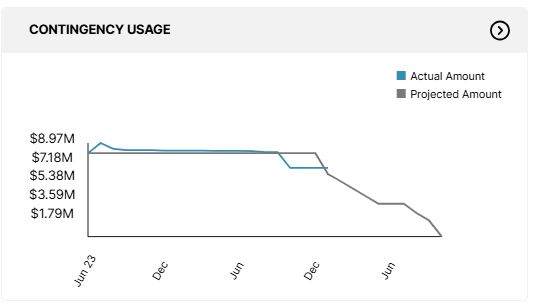
The Contingency Usage section of the dashboard provides a high-level view of your contingency projection with interactive drill-down capabilities.
Black Line (Projection): Represents the contingency usage forecast based on your project’s cash flow. This indicates the timeline areas where you anticipate using contingency funds.
Blue Line (Actuals): Displays the real-time usage of contingency funds up to the current date, calculated from approved budget revisions.
The dashboard highlights discrepancies and trends between your projections and actual usage, helping you spot potential risks early.
Drill-Down Details
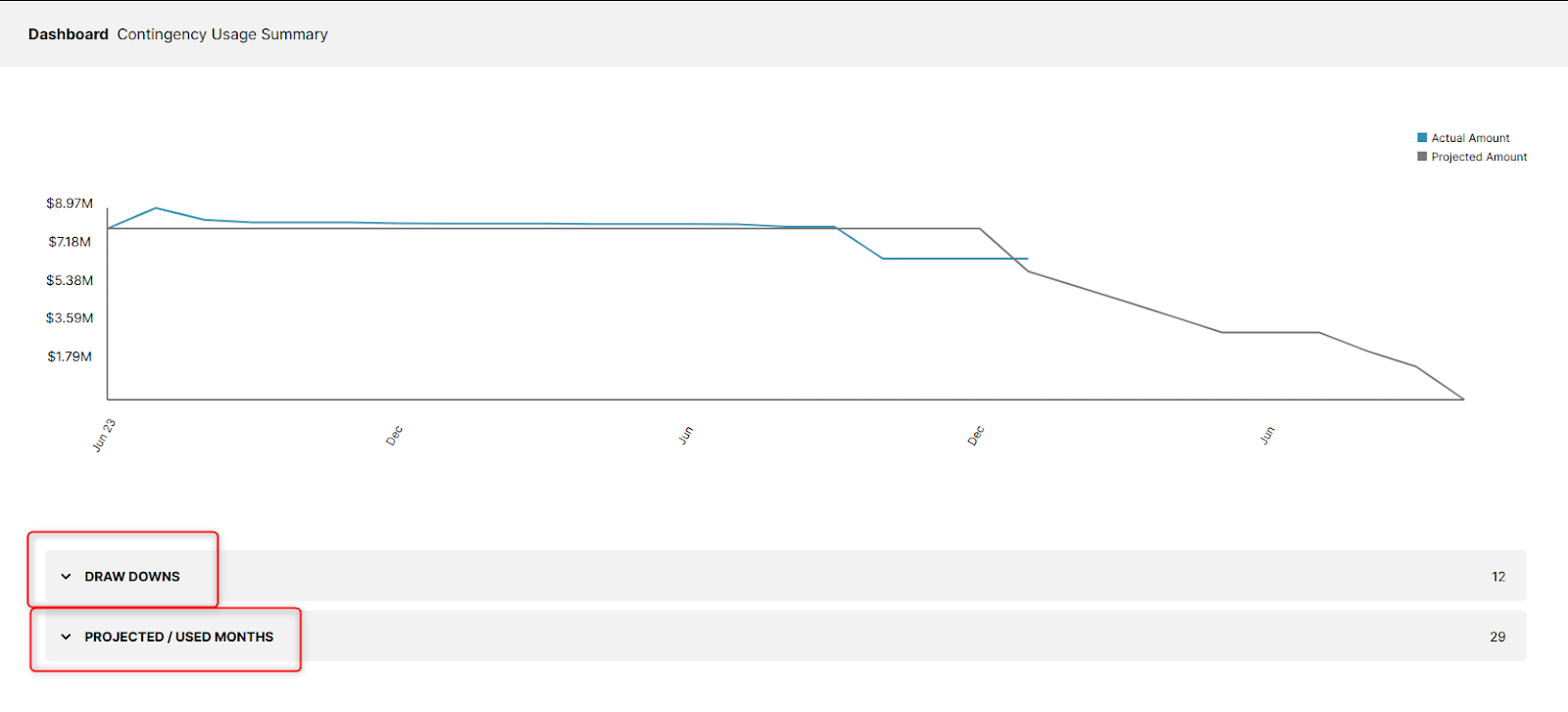
Clicking on the Contingency Usage Banner takes you to a detailed breakdown page featuring:
Contingency Usage Graph:
Combines projected and actual usage in a single visualization for quick comparison.
Draw Downs Folder:
A record of all budget changes affecting your contingency, including:
Approval dates.
Budget change descriptions.
Amounts moved to or from contingency.
Transfers from contingency are shown as negative values, while transfers to contingency are positive.
Projected/Used Months Folder:
Breaks down your entire contingency cash flow by month and year, showing:
Projected amounts.
Actual amounts used.
Provides granular insights into how funds are allocated over time.
Why It’s Valuable
Proactive Risk Management: Tailor projections and track real-time usage to avoid unforeseen issues.
Actionable Insights: Compare projections to actual usage to optimize allocations and improve accuracy for future planning.
Transparency: Gain a detailed understanding of how contingency funds are used across your project’s budget.
We’re confident that the Contingency Tracker will help you manage risks more effectively, improve budget transparency, and drive better outcomes for your projects. As always, we welcome your feedback to continue enhancing your experience.
Thank you for choosing us to support your success!
Release notes 12/13/24
Small fixes:
- Sort order for meeting attendee selection is now alphabetical using the first name.
- Document folder column alignment
- UL&E column renamed to "Exposures"
Bugs:
- Template schedule category duplications and errors resolved.
- Unarchiving error resolved.
- Estimate builder step 4 input error resolved.
- Meeting module server error message resolved.
- Disappearing tasks bug resolved.
Advanced Cash Flow Feature
We're excited to introduce PRIVV's Advanced Cash Flow feature, designed to simplify and automate your cash flow operations. Here's what's new:
- All-in-one Cash Flow management module
- Unified view: Access and update all budget code flow line items in a single modal.
- Streamlined workflow: Select start and end dates, choose a distribution model from the dropdown (or use the default), and let PRIVV automatically balance the cash flow.
- Fewer clicks: Manage your cash flow more efficiently, no more editing line items individually.
- New distribution models for automation
- Choose from a variety of distribution models to automatically balance Cash Flows:
- Normal distribution (Bell Curve)
- Uniform distribution (Straight line)
- Exponential front-loaded
- Exponential back-loaded
- None: Manually enter monthly cash flows
- Fine-tune monthly projections by selecting and editing specific cost code line items after the automatic balancing.
- Choose from a variety of distribution models to automatically balance Cash Flows:
- Spreadsheet-style editing
- Holistic view: Each row represents a cost code, showing total dollar amounts and unbalanced funds.
- Month-by-month editing: Edit projections directly within a spreadsheet-style grid.
- Track actuals vs projections
- Delta insights: Compare actual costs to projections, with clear indicators for surpluses or deficits.
- Redistribute balances: When actuals occur, PRIVV highlights the surplus or deficit for each cost code. Redistribute the balance with a single click or by entering amounts directly into future months.
- Historical snapshots: Capture "snapshots" of Cash Flows for historical records and reporting purposes.
- Interactive visuals and reports
- Bar and line charts: Toggle between views for projections, actuals, or cumulative data.
- Customizable visuals: Show or hide dollar amounts and cumulative data for a tailored display.
- Snapshot comparisons: View historical and current cash flow snapshots side by side.
- Report generation: Print or export visuals for seamless presentations.
Recurring Meetings
- Meetings can be scheduled on a weekly, monthly, and yearly basis. Meetings are viewable 30 days in advance.
- Invite attendees to a meeting once and it will generate each instance for the participants.
- Set a specified end date and have meetings recur until then.
Release notes 11/8/24
Custom Cost Codes
- The limit has been increased to create up to five custom cost codes for each category, per project, for better budgeting flexibility.
Notifications
- Notifications now cover task assignments, approval requests, and alerts when a pay application PDF is ready to view.
- Only notifications from the past 30 days will display, and there’s an option to filter to show only unread notifications.
Pay Application management
- A new option lets you permanently delete Pay Applications stored in the deleted container.
Procurement comparison totals
- Grand totals are now visible, making it easier to review costs.
Improved Sorting options
- Enhanced sorting capabilities across the app for quicker navigation.
Access Control for assignments
- The “Assign-to” dropdowns now limit view options to project users only, improving privacy and security.
Integrations and improvements
- Support feedback widget
- Fully integrated with developer tools to streamline bug reporting and accelerate resolution times.
- Please use support@privv.co to report bugs or if you have questions for the PRIVV team.
- Performance upgrades
- Several performance improvements to enhance overall app speed and responsiveness.
Next Roadmap Items
- Notifications can be cleared to easily remove them from your view.
- Security enhancements
- Single Sign-On (SSO) and multi-factor authentication for better account security.
- Cash Flow modeling automation
- A revamp of Cash Flow modeling with new automation features, reporting and dashboard charting.
- Procore integration
- Integration with Procore for Drawings/Planroom.
- Contingency report updates
- Enhanced Contingency Usage Reports and a new dashboard view for tracking.
- Recurring meetings
- The ability to create recurring meetings.
Release notes 10/18/24
Photos
- User now has the ability to rearrange the order of the photos on the dashboard – feature resides in photo module.
Payment transactions
- Added support for users to create negative invoicing.
- User rules applied to editing committed transactions. User is locked out of changing original commitment once an invoice or amendment has been created on the cost code.
- User can now create negative amendments to accommodate typical transactions.
- In-app notifications added for Pay Application PDF generation and Budget Revision PDF generation once the PDF is ready to view.
Budget
- Changed the budget column "Projected Budget" to "Current Budget" to conform with the industry standard.
- Column alignment on Budget screen. Align tables on commitment detail.
Performance
- Performance optimizations have been pushed to production to increase page load speed for most commonly used modules.
- All notes get pulled down at Home screen. The rest of module data gets loaded on dashboard screen.
- Bug fixes: PDF generation error. Invoice attached image deletion.
Next release
- Users will have the ability to create and set recurring meetings with all attendants in a 2-step process.
- Sorting applied across all modules.
- Grand totals on Procurement comparison page.
- Limited view to project users for Assign-to dropdowns across app.
- Optimizations to Schedule detail.
- Ascending order on all containers within PRIVV.
Release Notes 10/10/24
Performance
- Reduced load times.
Meetings
- Spell check added in Meetings Notes text box.
- Meeting Notes are saved automatically.
- Meeting Notes are only visible to the organizer.
- Meeting Notes attendees changed to only show users who took Meeting Notes.
Pay Applications
- Added support for decimal in Pay Applications numbers.
- Previously created Pay Application number shown as reference when creating new Pay Application.
- Users can permanently delete Pay Applications to reset the sequenced Pay Application number.
Our Team
- Name and Title are separated.
- Columns are now sortable.
- Fixed ability to update Our Team person role and details, change passwords.
Billing
- Billing KPIs now visible at the top of the Billing page.
Invoice
- Fixed issue where tab was skipping invoice amount on Invoice page.
Dashboard
- Budget Analysis widget updated.
Custom Cost Codes
- Users can submit custom Cost Code for System Admin approval.
Tasks
- Added sort capability for column headers on Misc Tasks section.
- Corrected Misc Task screen to look/act like other Tasks screens.
- Added Filter in Misc Tasks to hide Tasks that are Done.
- Fixed the issue where scrolling in the Task module removed sorting.
Schedules
- Added ability to link from Schedule activity directly to related SOP tasks.
Budgets
- Budget change now auto-debiting Contingency.
Procurement
- Column alignment issues and header placement.
Upcoming Updates
- Remove Estimates when Show on Dashboard is unchecked from Budget page.
- Cash Flow updates.
- Contingency updates - project health.
- Performance updates.
Next Roadmap Items
- Closeout handling.
- EKG project modal.
- Setting retainage on Billing.
Retention release.
- Data inbox.
- Cash Flow distribution models and Dashboard graph.
- Contingency Usage rework and Dashboard.
- Team Notifications for when new templates are available.
- Notifications to System Admin for Project Manager requested cost codes.
- Update to Budget Detail screen and projected cost calculations relating to exposures.
- Photo albums.
Release Notes 9/13/24 – Template Builder
Schedule Templates
- Users can now create custom Schedule templates.
- Users can create Schedule activities and Schedule phases.
- System Admins can activate Schedules and apply them to Projects.
Workplan Templates
- Users can now add tasks to Workplans within a project.
Note: This is not categories or subcategories, in order to delineate Workplans from miscellaneous tasks.
Estimate Templates
- Users can now add project cost codes on the Estimate level.
Hide/Show Cost Codes
- On the Budget or Estimate, users can hide any cost code that has a zero dollar amount
Note: This does not include cost codes that had an original dollar amount that was deducted from the cost code.
- Hidden cost codes will transfer over to the Budget level.
- Users can show all cost codes from the overflow on the Budget or Estimate screens or individual hidden cost codes from the overflow on the line item.
- If a budget change or adjustment occurs that adds funds to a hidden cost code, the hidden cost code will be unhidden automatically.
Estimate Algorithm
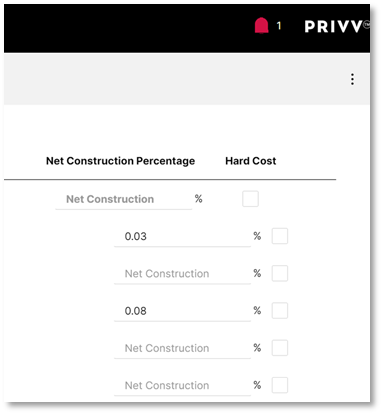
- Algorithm has been changed and now uses Construction Cost Index percentages to bring historic values to present values to calculate Net Construction Cost. Then, the algorithm uses the percentages set at the template level to derive costs for the assigned line items based on that net construction cost.
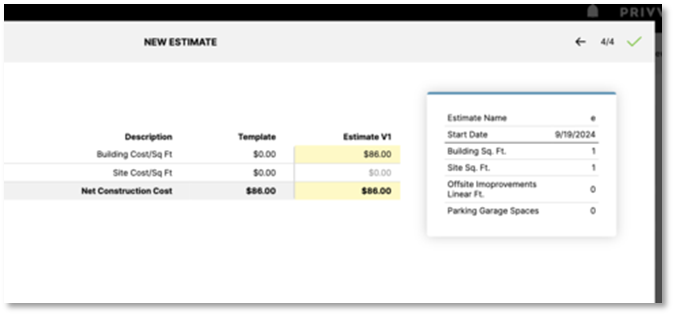
- Final page of the Estimate creation form will only show values for the square foot measurements given.
Budget and Estimate Changes
- The Info button on the Estimate and Budget screen is now an editable modal for more than just the Budget or Estimate name.
- Users can now change the project’s square foot measurements.
- Users can now view the original cost per square foot provided during step 4 of Estimate creation for each measurement type.
- Users can now view the current cost per square foot based on the current Net Construction Cost for each measurement type.
- The Budget detail screen now shows square footage and values, like the Estimate detail screen.
- Adding Budget change to Revision from the revision screen now shows the description in the dropdown.
- Project Managers can now make a copy of an approved estimate.
Configuration
- System admins can set up organizational level codes that can be used across all the templates.
- If a user creates a new cost code not on the master list, they can submit that to be approved in which case it will be added to any master lists it applies to.
- URL route updated.
Notifications
PRIVV now has notifications for task assignments and requested reviews/approvals.
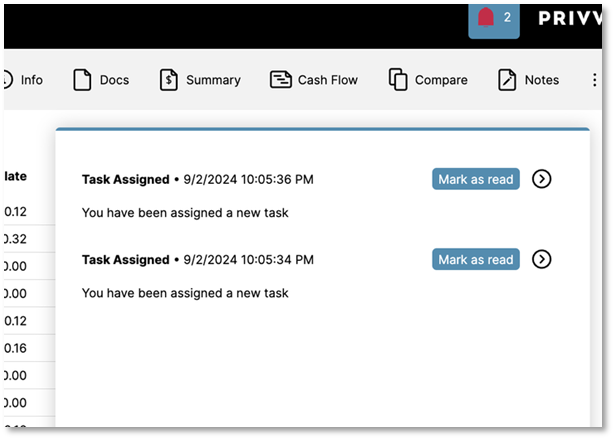
- Clicking on the notification will navigate the user to the page in the description.
- The message has changed to include the task name or the name of the request for approval.
- Notifications are real time and do not require the user to refresh the page.
- When a user generates a pay application or revision, a notification will let the user know when it has been generated and is ready to be viewed.
Custom Cost Codes
- Users can create a new cost code in the project (up to two per category)
During the cost code creation process, a checkbox is checked by default to submit the cost code to the organization code list for approval by the System Admin. If the cost code is approved, it can be added to the company project templates and the organization estimate cost code list. Unchecking the box stores the cost code as unique to the project and will not be submitted for approval.
Cash Flow
- The graph now shows cumulative amounts when hovering over bars on the Dashboard.
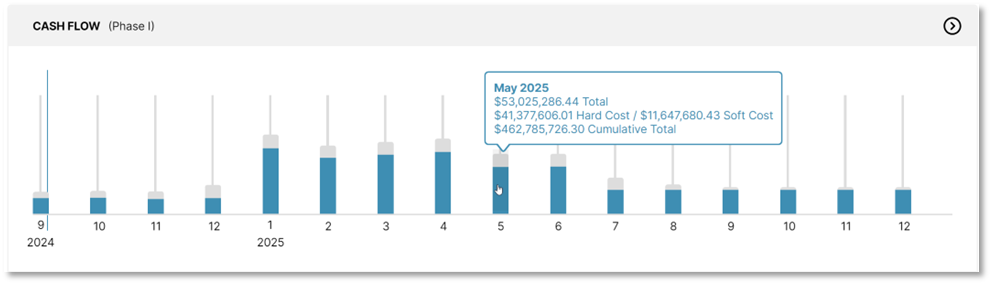
- Cash Flow print report shows a column for cumulative amounts on actuals and projected.
Cost Log
- Sorting has been added to Date, Initial Amount, and Final Amount.
Adjustments
- Sorting has been added to Adjustments on the main Budget page.
Reports
- Page header font size increased to improve visibility.
Departments/Clients
- URL route updated.
Next Roadmap Items
- Notification settings
- Admin user permissions
- Cash Flow modeling and report
- Contingency usage rework
- Closeout handling
- EKG project modal
Release Notes 8/14/23
TABLE OF CONTENTS
Was this article helpful?
That’s Great!
Thank you for your feedback
Sorry! We couldn't be helpful
Thank you for your feedback
Feedback sent
We appreciate your effort and will try to fix the article