General FAQs
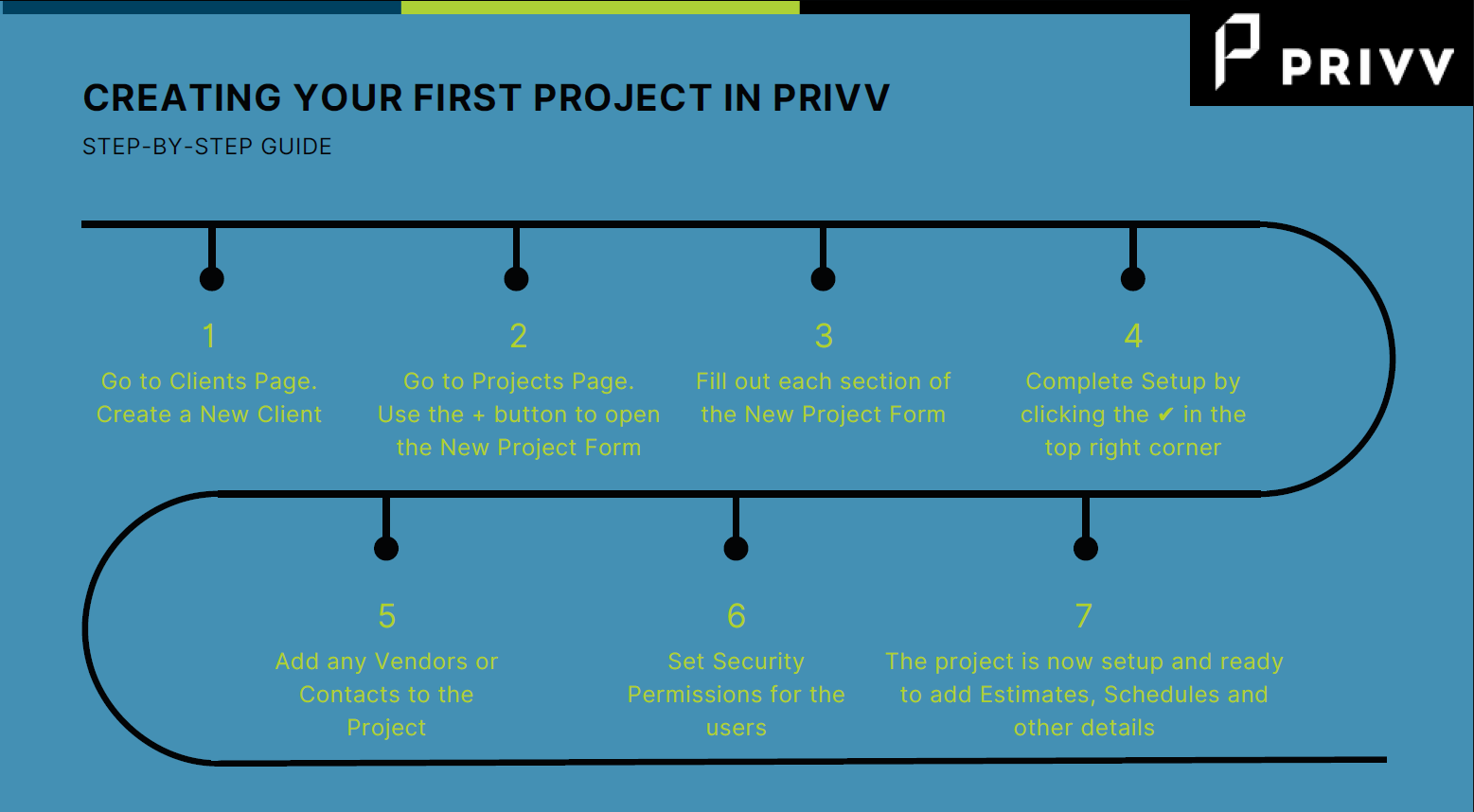
- How do I set up a new project in Privv?
- What website should I visit to login to my Privv account?
When you first try to access Privv, you might not know the exact web address or URL to use. The following is a guide discussing the various ways to access your Privv Account.- If you received an email notification that you have been added as a user to Privv, locate the email and click on the link to access Privv. Depending on your company email settings, this email may get sent to your junk or spam folder. The email will arrive from software@privv.co email address. Search your inbox and junk folder for this email address. Adding the email address to your trusted contact list will ensure that future emails will be received in your inbox.
- If you cannot locate the email but you know your login credentials, you can try using this link: https://www.privvapp.com/
- Helpful hint: Privv web addresses are formatted like https://[CompanyName].privapp.com.
- If none of the above works for you, please reach out to your account manager. They will be able to tell how to access your Privv account.
- How do I access my account?
To log into Privv, go to your account login portal page, enter your Email and Password, then hit Sign In.- Keep in mind, passwords are case-sensitive.
- If you forgot your password, click Forgot Password? Type in your email and click Reset Password. A link to reset your password will be emailed to the email address associated with your account within a few minutes. Follow the steps in the email to reset your password and go back to your account login portal page to sign in with your new password.
- How do I reset my password?
If you forgot your password, click the Forgot Password? link. Type in your email and click the Reset Password button. A link to reset your password will be emailed to your email address for your account within a few minutes. Follow the steps to reset your password and return to your account login portal page to sign in with your new password. - How do I navigate through Privv?
Once you have logged in to your Privv account, there will be several areas available to you depending on the permissions granted to you in the platform.- MAIN PAGE
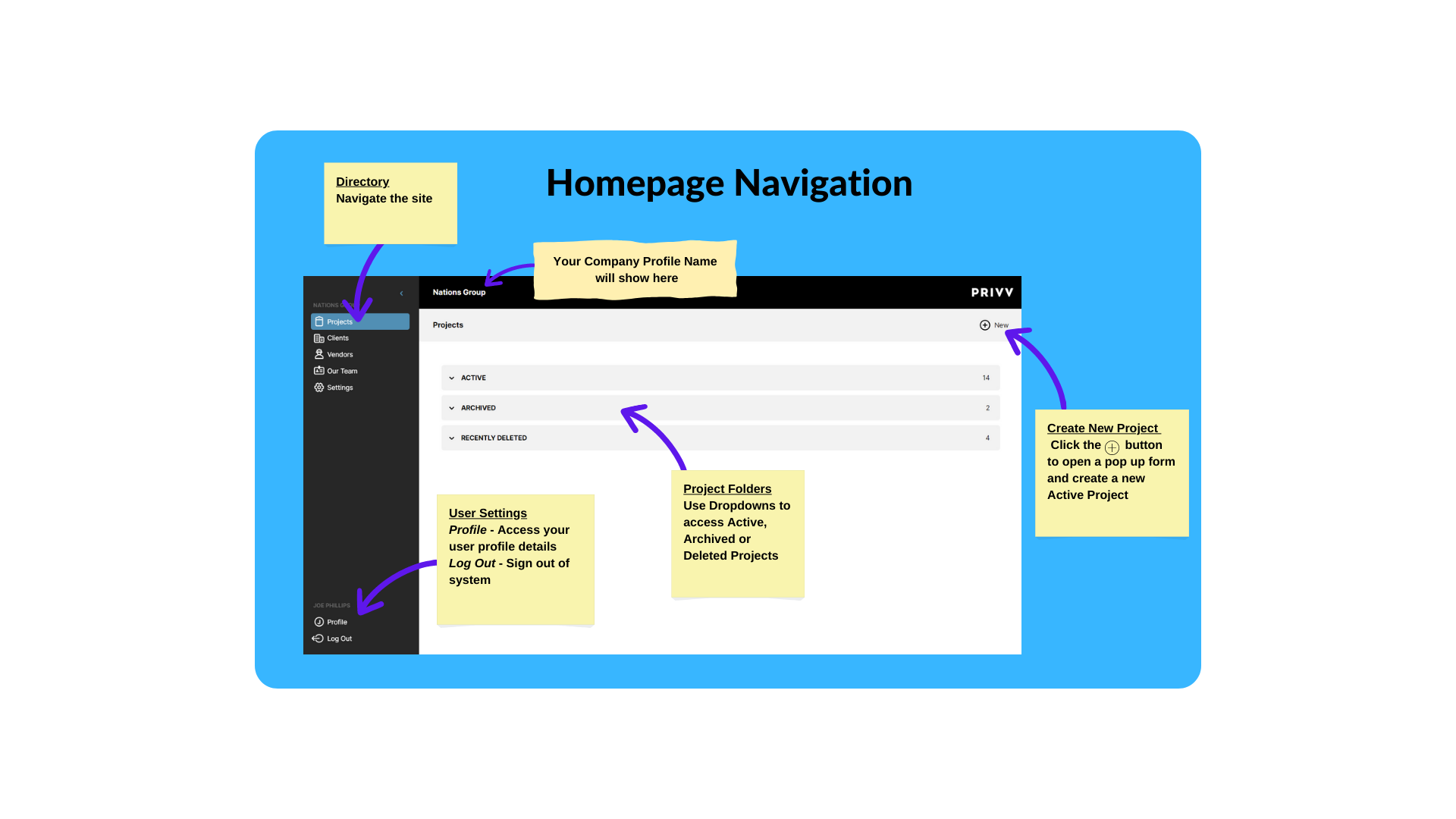 PROJECTS: When you log in, Privv will open to the Projects page by default. The Projects page shows a list of all the projects you have been assigned. The first section of projects that appears are the active projects you have been assigned. Below are the Archived and Deleted Projects.
SIDEBAR: Along the left side of the page is a sidebar that contains all the company modules used for setting up your company, clients and vendors. Selecting a project from the project screen will add the project modules to the sidebar. At the bottom of the sidebar, you can edit your Profile or Sign Out.
Sidebar contains the following modules:- Projects: The Projects page shows a list of all the projects you have been assigned.
- Depending on your version of Privv, you will either see the Departments page or Clients page.
- Departments: The Departments page shows all departments associated with Privv.
- Clients: The Clients page shows a list of all clients assigned to projects in Privv. This is where you add a new client to the platform.
- Vendors: The Vendors page shows a list of all vendors assigned to projects in Privv. This is where you add a vendor to the platform.
- Our Team: The Our Team page shows the members of your team, their information, their assigned role in Privv, if they have accepted their invite to join Privv, and a button that shows any projects that team member is working on.
- Configuration: If you are an Admin on your team's Privv, the Configuration page is where you will set up your company's settings.
- Knowledge Base: The Knowledge Base directs you to this Knowledge Base of help articles and tutorials on different aspects of Privv.
- MAIN PAGE
- How do I get technical support for Privv?
- Submit a ticket here.
- Submit a ticket here.
Was this article helpful?
That’s Great!
Thank you for your feedback
Sorry! We couldn't be helpful
Thank you for your feedback
Feedback sent
We appreciate your effort and will try to fix the article